Downloading the Melbet app in Somalia is not quite as simple as tapping "install" in an app store, and this guide explains exactly why — and how to do it safely. Because Melbet handles real-money betting, Google keeps it out of the Play Store, so Android users install an APK file directly from the official site. iPhone users go through the App Store, where availability is region-gated. Below you will find step-by-step instructions tested by Abdirahman, honest notes on system requirements for the phones most common in Somalia, and a troubleshooting section for when the app will not install. Version numbers and requirements change often, so always confirm the current details on the official site before you begin.
Melbet App at a Glance
- Android: Not on Google Play — install the APK from the official Melbet site (with "unknown sources" enabled).
- iOS: Available through the Apple App Store, published by Pelican Entertainment B.V., but region-gated — verify it appears in your store.
- Approx. size: around 50 MB for the Android app; the iOS build is larger. Confirm the current size before downloading.
- Cost: free to download.
- Account: the app uses the same account as the website, so you can register or log in from either.
- Legality: Melbet is licensed in Curacao, not in Somalia. See our pillar review, is Melbet legit in Somalia?
Why Melbet Is Not on the Google Play Store
Google restricts real-money gambling apps on the Play Store in most countries, so you will not find an official Melbet app there. Any "Melbet" listing you do see on Play is almost certainly unofficial and should be avoided. The only safe source for the Android app is the official Melbet website. Fake APK files circulated on random blogs, Telegram groups or file-sharing sites are a common way malware is spread, so treat any download link that is not the official domain with suspicion. Because the ISP block in Somalia can make the main site hard to reach, some users rely on the app itself or an official mirror link to get through — we cover that in our login and access guide.
How to Download and Install the Melbet APK on Android
Tested by Abdirahman on Android. The whole process usually takes under a minute on a normal connection.
Step 1 — Open the official site
Using your phone browser, go to the official Melbet website and find the mobile apps or "Applications" section, usually linked in the footer or a phone icon in the menu. Choose the Android version to download the APK file.
Step 2 — Allow installs from unknown sources
Because the file does not come from Google Play, Android will block it by default. On Android 8 and newer, when you open the APK your phone prompts you to allow your browser to install unknown apps — tap the prompt, then toggle Allow from this source. On older versions the setting lives under Settings → Security → Unknown sources. You can switch this off again after installing.
Step 3 — Install the APK
Open the downloaded file (check your Downloads folder or the notification), tap Install, and wait for it to finish. If your phone runs Play Protect, it may show a warning for any app installed outside the store; you can proceed once you are sure the file came from the official site.
Step 4 — Open and sign in
Launch the app, then log in with your existing account or create a new one. If you are registering for the first time, our Somalia registration guide walks through all four sign-up methods and where to enter our current promo code.
Melbet for iOS (iPhone and iPad)
On Apple devices the app is distributed through the App Store rather than as a sideloaded file, which makes installation simpler — but availability depends on your store region. Search for "Melbet" in the App Store; if it appears (published by Pelican Entertainment B.V.), tap Get and it installs like any other app. If it does not appear in the Somali store, it may be listed in another region. In that case the mobile website, which works in any browser and uses the same account, is the reliable fallback. Do not install profiles or "enterprise" certificates from unofficial sources claiming to offer the app — that is a common scam vector. iOS builds typically require a recent iOS version, so check the current requirement on the App Store listing.
System Requirements and Somali Phones
Melbet's mobile app is designed to run on the affordable Android handsets that dominate the Somali market — brands such as Tecno, Infinix and itel — as well as Samsung and iPhone. A few practical notes:
- Storage: many budget phones ship with limited internal storage. Although the app is around 50 MB, it needs extra free space to install and to store its cache, so clear a few hundred megabytes first if your phone is nearly full.
- Android version conflict — read this honestly: different Melbet pages state different minimum Android versions. Some list Android 5.0 as the minimum, while others state a much higher figure such as Android 12.0. These minimum requirements vary between builds and over time, so do not treat any single number as final — check the requirement shown on the current version before you download. As a general rule, a reasonably up-to-date Android or iOS phone will run the app fine.
- Data: the first download uses the most data; after that the app is lighter than reloading the full website.
Keeping the App Up to Date
Because the Android app is not distributed through Google Play, it does not update automatically. Melbet pushes new versions periodically, and an outdated app can start to misbehave — login failures, payment screens that will not load, or missing markets. If something stops working after weeks of normal use, the fix is usually to return to the official site and download the latest APK over the top of the old one. You will not lose your account, since everything is stored server-side. On iOS, updates arrive through the App Store as normal.
Troubleshooting: App Not Installing
- "App not installed" error: usually caused by low storage or a partly downloaded file. Free up space and download the APK again from the official site.
- Install blocked by Play Protect or security: confirm the file is from the official domain, then allow the install from unknown sources as described above.
- Cannot reach the download page: the ISP block can prevent the main domain from loading. Try an official mirror link, which we discuss in the login and access guide.
- App opens but will not load content: update to the latest version, check your connection, and clear the app cache in your phone settings.
- Ready to fund your account: once installed, see our EVC Plus deposit guide for how to add funds from mobile money.
A Note on Safety and the Law
Downloading and using an offshore betting app carries risks beyond malware. Melbet is internationally licensed in Curacao but is not licensed or regulated in Somalia, where gambling is illegal and mobile-money providers have been ordered to block gambling transactions. That means there is no local consumer protection if something goes wrong. We cover the legal and religious context in full in our pillar guide, is Melbet legit and safe in Somalia?, and you can read about betting restrictions in our Somalia section.
Android Settings Path by Version
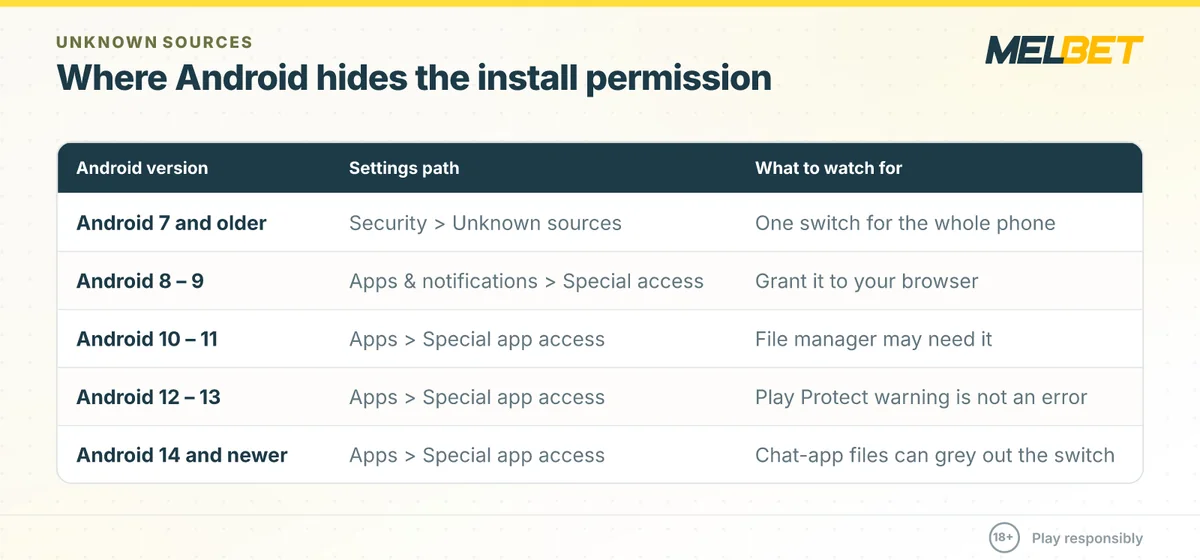
The single most common reason an APK refuses to install is that the phone has not been told to accept apps from outside the Play Store. Where that switch lives changed several times across Android releases, and most guides only describe one of them. Use the row that matches your phone:
| Android version | Where the permission lives | What to watch for |
|---|---|---|
| Android 7 and older | Settings > Security > Unknown sources | One switch for the whole phone. Turn it off again once the app is installed. |
| Android 8 – 9 | Settings > Apps & notifications > Special app access > Install unknown apps | The permission is per app. Grant it to the browser you downloaded with, not to the system. |
| Android 10 – 11 | Settings > Apps > Special app access > Install unknown apps | If you opened the file from a file manager, the permission must be granted to the file manager. |
| Android 12 – 13 | Settings > Apps > Special app access > Install unknown apps | Play Protect shows a warning screen after you tap install; that screen is not an error. |
| Android 14 and newer | Settings > Apps > Special app access > Install unknown apps | Restricted settings can grey out the switch when the file arrived through a chat app. Save the APK first, then open it from the Files app. |
Some phone makers rename these menus. On Tecno, Infinix and itel devices the section is often under Settings > Security & privacy, and on Samsung it sits under Settings > Apps > Special access. If you cannot find it, search the word unknown in the settings search box.
Install Error Messages and What They Actually Mean
Android error messages are short and unhelpful. This table maps the exact wording you are likely to see to the real cause and the fastest fix.
| Message on screen | What it means | Fix |
|---|---|---|
| App not installed | An older build with a different signature is still on the phone. | Uninstall the existing Melbet app, restart the phone, then install the new APK. |
| There was a problem parsing the package | The download finished incomplete, or the file was cut short by a dropped connection. | Delete the APK, clear the browser download list and download again on a stable connection. |
| Blocked by Play Protect | Google scans apps from outside Play by default. This is a warning, not a virus report. | Tap More details, then Install anyway, but only if you downloaded from the official Melbet site. |
| Insufficient storage available | Android needs free space for both the file and the unpacked app. | Free up space, then install. Clearing the cache of large apps is usually enough. |
| App not compatible with your device | The Android version on the phone is below the minimum the build requires. | Update Android if your phone allows it, otherwise use the mobile site in your browser. |
| Installation stops and the screen returns to Files | Battery saver or a restricted setting interrupted the installer. | Plug the phone in, disable battery saver, and try again from the Files app. |
App or Mobile Site: Which One in Somalia?
Not everyone needs the APK. On a phone with little storage or a slow connection, the browser version can be the better choice. Compare before you install:
| What matters to you | Android app (APK) | Mobile site in a browser |
|---|---|---|
| Installation | Manual download plus a permission change | None, open the address and log in |
| Storage used | App plus its cache stays on the phone | Only browser cache, which you can clear |
| Updates | Manual, or a prompt inside the app | Automatic, the server always serves the current version |
| Notifications | Push alerts for results and bonuses | Not available on most browsers |
| Data use on a slow link | Lighter after first load, most assets are stored locally | Heavier, page assets reload more often |
| Shared or borrowed phone | Leaves a visible app icon | Leaves nothing once you log out and clear history |
| iPhone | Install through the site, not the App Store | Works immediately in Safari |
A practical middle ground on iPhone and on Android: open the mobile site once, then use your browser menu to add it to the home screen. You get an icon that behaves like an app without installing anything.
Data Use on a Slow or Capped Connection
Bundles in Somalia are usually bought in small blocks, so it is worth knowing which parts of the app consume the most. Live video is by far the heaviest, followed by animated match centres; plain odds lists and bet slips are light.
- Turn off automatic playback of live streams and open a stream only when you intend to watch it.
- Prefer the list view over the animated match view when you are only following the score.
- Switch off notification types you do not use, since each one wakes the connection.
- Open the app once on Wi-Fi after an update so the new assets download outside your bundle.
- If the connection drops mid-bet, check the bet history before repeating the bet, so you do not place it twice.
Using the App Safely on a Shared Phone
Many people in Somalia share a handset with family or use a shop phone. A few habits prevent an account from being opened by someone else:
- Log out when you finish instead of only closing the app.
- Do not let the browser or the app store your password on a device that is not yours.
- Where the app offers a PIN or fingerprint lock, switch it on.
- Clear notifications after a session, because balance and result alerts appear on the lock screen.
- Keep the phone number on the account under your own control, since it is used for recovery and for withdrawals.
Responsible Gambling (18+)
Sports betting and casino games should be entertainment, never a way to make money. Only stake what you can afford to lose, set deposit and time limits, and never chase losses. Gambling is strictly for adults aged 18 and over. Melbet is not licensed or regulated in Somalia, where gambling is illegal under the 1962 Penal Code and Sharia principles, and the November 2023 NAMLC directive ordered banks and mobile-money providers to freeze gambling-related transactions. This page is information only and does not encourage you to break the law. If gambling is becoming a problem for you or someone close to you, seek confidential help from GamCare (gamcare.org.uk) or Gambling Therapy (gamblingtherapy.org), which offers multilingual support for people in the diaspora. For more on our approach see our responsible gambling page.
About This Guide
Affiliate disclosure. somaliamelbet.com is an independent information website. It is not operated by or officially owned by Melbet. Some links on this site are affiliate links: if you open an account through them, we may earn a commission at no extra cost to you. This does not influence our verdict — our reviews are based on hands-on testing, published criteria and honest analysis, including weaknesses. Melbet is operated by Pelican Entertainment B.V. and is internationally licensed in Curacao; it is not licensed in Somalia. Betting carries financial risk. Read more on our about page and methodology. Please gamble responsibly — 18+ only.
Comments
No comments yet.